130+ Page Ebook Template Canva | Streamline Your Publishing Process
Creating a professional ebook from scratch often feels like navigating a maze blindfolded. You have the knowledge, the content, and the audience, but the design process can stall your momentum. The 130+ Page Ebook Template Canva is built to bridge that gap between your expertise and a polished final product. It is not just a collection of blank pages; it is a comprehensive framework designed specifically for entrepreneurs, coaches, bloggers, and course creators who need to publish high-quality content without hiring a professional graphic designer.
Comprehensive Design Assets for Every Chapter
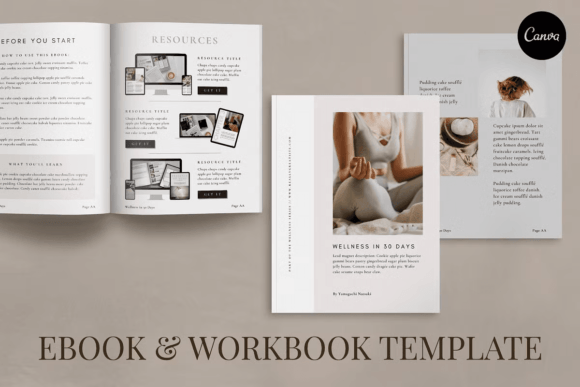
The strength of this resource lies in its sheer volume and variety. When you download this package, you are not getting a static file. You are gaining access to a library of design assets that covers every aspect of a modern publication. The structure includes over 30 distinct content pages, multiple chapter title options, and specific layouts for quotes, testimonials, and team introductions.
For instance, if you are a small business owner creating a brand guide, the 4 About the Team Pages allow you to introduce your staff with consistency. If you are a coach offering a course workbook, the 16 Worksheets provide interactive spaces for your students to take notes and apply lessons. The inclusion of Charts and Diagrams is particularly useful for marketers who need to visualize data or explain complex workflows. This level of detail ensures that your visual hierarchy remains consistent from the title page to the back cover, reinforcing your brand identity throughout the reader's journey.
Modern Typography and Visual Hierarchy
Visual hierarchy is the backbone of good editorial design, and this template handles it with precision. The layouts are designed to guide the eye naturally, using modern typography principles to separate headings from body text. You will find that the default font pairings strike a balance between readability and style, ensuring that your message is never lost in decorative flourishes.
While the template comes with suggested styles, the true value lies in its adaptability. You can easily swap the default sans serif font for a premium font that better matches your brand’s voice. If your brand identity relies on elegance, you might introduce a script font for headers. If you prefer a minimalist aesthetic, sticking to a clean sans serif font maintains that modern feel. The template supports these changes without breaking the layout, allowing you to customize the typography to match your existing marketing materials. This flexibility is crucial for maintaining consistency across your digital and print presence.
Practical Applications for Entrepreneurs and Creators
Think of this template as a blank canvas that comes with guardrails. It is perfect for a variety of projects beyond a standard ebook. Here are a few practical scenarios where this asset shines:
- Lead Magnets: Use the 9 Resources & CTA Pages to create a high-value PDF that captures email addresses. The professional layout increases perceived value, making visitors more likely to subscribe.
- Course Workbooks: The 16 Worksheets and Steps and Tips pages are ideal for educational content. You can create a companion guide that students print out or fill in digitally.
- Brand Guidelines: Utilize the Gallery Pages and Charts to document your brand’s color palette, logo usage, and voice. This ensures consistency when working with freelancers or new hires.
- Digital Magazines: The Gallery Pages and Content Pages offer enough variety to compile a monthly newsletter or digital magazine for your community.
Customization and Ease of Use
One of the biggest hurdles in design is the learning curve of professional software. This template removes that barrier entirely by utilizing Canva. You do not need a subscription to Adobe Creative Cloud or knowledge of layers and vectors. Everything is customizable with a free Canva account.
You can move and scale elements, change background colors, and edit text formats with simple drag-and-drop functionality. The template is provided in both A4 and US Letter sizes, making it versatile for international audiences. Whether you are a hobbyist sharing a recipe collection or a publisher launching a new series, the ability to tweak every pixel ensures the final product looks exactly how you envisioned it. This ease of use does not compromise quality; the files are structured to maintain high resolution whether viewed on a screen or printed.
Enhancing Audience Engagement
A well-designed document does more than just look good; it builds trust. When a potential client opens a PDF with inconsistent margins, misaligned text, or amateurish graphics, it reflects poorly on your business. Conversely, a polished layout signals professionalism and authority.
By using a structured template, you ensure that your content is scannable. The inclusion of Quote Pages breaks up long blocks of text, while Testimonial Pages provide social proof where it matters most. These design elements keep the reader engaged, reducing bounce rates and increasing the likelihood that they will consume your entire message. For content creators and bloggers, this translates to higher retention and better conversion rates on your calls to action.
Ultimately, the 130+ Page Ebook Template Canva