Dog Tag Canva Frame Template Pet Tag_2: A Creative Digital Asset
The demand for personalized pet accessories is surging, driven by pet owners who view their animals as family members. For small business owners and creative entrepreneurs, this presents a lucrative opportunity, but the design process can often be a bottleneck. The Dog Tag Canva Frame Template Pet Tag_2 is a digital asset specifically engineered to solve this problem. It provides a structured, professional foundation for creating custom pet ID tags without requiring advanced graphic design skills or expensive software licenses. This template is not a physical product; it is a 17-page PDF containing a direct link to an editable Canva file, offering immediate access to a versatile design tool.
Anatomy of a Versatile Design Asset
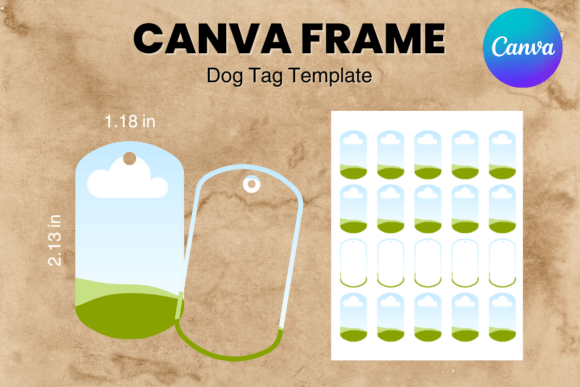
Understanding what this digital file includes is the first step to leveraging its potential. The Dog Tag Canva Frame Template Pet Tag_2 delivers a set of 17 custom-made frame templates, each sized at approximately 1.18 by 2.13 inches. These dimensions are standard for many commercial pet tag blanks, making the templates immediately practical for production. The file is designed for 8.5x11 inch paper, allowing for easy printing and cutting of test proofs or final products using home or office printers.
The core of its value lies in its editability. This is not a static PNG or SVG file. It is a fully editable Canva template, which means you can manipulate every element directly within Canva's user-friendly, browser-based interface. The design features a transparent layer, a critical feature for crafters and makers. This transparency allows the tag shape to be used as a precise cut guide for vinyl cutters or as a clear overlay for sublimation printing, ensuring the final product has clean, professional edges. The easy drag & drop functionality of Canva makes customizing these frames intuitive. You can change colors, add text, insert photos of pets, or upload your own brand graphics. Furthermore, the template sizes are approximate and can be scaled up or down within Canva to suit different tag blanks or creative projects, offering a level of flexibility that static files cannot match.
From Digital Template to Tangible Product: Practical Applications
The true test of any design asset is its application in real-world projects. The Dog Tag Canva Frame Template Pet Tag_2 excels as a foundational element in a commercial workflow. For entrepreneurs on platforms like Etsy or Shopify, it streamlines the creation of a product line. You can develop a series of themed tags—holiday specials, breed-specific designs, or minimalist styles—by simply duplicating and modifying the base template. This consistency is vital for building a recognizable brand identity in a crowded marketplace.
Beyond direct product creation, this template serves as a powerful design asset for marketing and branding. A pet grooming salon, veterinary clinic, or dog walker could use the frames to design loyalty cards, referral program tags, or branded merchandise for clients. The uniform size and professional appearance help maintain visual consistency across all print and digital touchpoints. For content creators and bloggers in the pet niche, the templates can be used to create engaging social media graphics, mock-ups for blog posts about pet safety, or branded elements for email newsletters. The ability to quickly generate on-brand graphics without starting from scratch saves significant time and reinforces brand perception.
Strategic Integration and Workflow Optimization
Incorporating this template into your creative process requires a strategic approach to maximize its value. First, consider your project's specific needs. Are you creating a one-off custom tag for a client, or are you building a scalable product catalog? For single projects, the template offers a quick, professional starting point. For catalog development, establish a style guide within Canva using this template: define your standard color palettes, approved fonts (pairing a clean sans serif font with a playful script font can work well for pet brands), and logo placement. This ensures every tag you produce contributes to a cohesive brand identity.
Evaluating the fit involves looking at the template's inherent style. The "Pet Tag_2" frame likely has a specific shape—perhaps a classic oval, a bone, or a modern circle. Does that shape align with your target audience's taste? Test the template by creating a few sample designs. Does the visual hierarchy feel natural when you add a pet's name and a phone number? Is the text readable at the small physical size? These practical tests are more valuable than any theoretical analysis. Remember, the template is a starting point. Your skill in selecting complementary colors, fonts, and imagery will determine the final product's professionalism and appeal.
Leveraging Canva's Ecosystem for Enhanced Creativity
The power of the Dog Tag Canva Frame Template Pet Tag_2 is amplified by Canva's extensive ecosystem. Once you have the template, you can access Canva's vast library of free and premium elements—photographs, illustrations, and icons—to enrich your designs. For instance, you can find high-quality pet portraits or subtle background textures to add depth. Canva's font library allows you to experiment with different typefaces, from bold display fonts for names to legible serif fonts for contact information, all while staying within the editable template structure.
This integration also simplifies collaboration. If you work with a team or hire a virtual assistant for order fulfillment, you can share the Canva template link directly. They can then duplicate the design for each new order, following your pre-established style guide, ensuring consistency even as your business scales. This transforms the template from a simple design file into a core component of your operational workflow, enhancing both efficiency and brand consistency.
Ultimately, the Dog Tag Canva Frame Template Pet Tag_2 is more than just a set of frames. It is a gateway to entering or expanding within the personalized pet product market with a low barrier to entry. It democratizes professional design, allowing entrepreneurs, crafters, and hobbyists to produce polished, market-ready products. By focusing on practical application, strategic integration, and leveraging the tools Canva provides, you can turn this digital file into a tangible asset that drives engagement, builds your brand, and meets the growing demand for customized pet care. The key is to view it not as a finished product, but as a versatile foundation upon which you can build your unique creative vision.