Tax Deduction Tracker Canva Template 3: Your Financial Design Solution
Let’s be honest: tax season rarely feels like a creative endeavor. For designers, entrepreneurs, and content creators, the scramble to find receipts usually ends in a shoebox full of crumpled paper or a chaotic spreadsheet. You wouldn't ship a design project with messy layers, so why approach your finances that way? Tax Deduction Tracker Canva Template 3 bridges the gap between professional organization and visual clarity. It is a practical tool designed to streamline your record-keeping without forcing you to learn complex accounting software. By treating your financial data with the same respect you give your brand assets, you save time, reduce stress, and ensure you never miss a deductible expense.
A Visual Anatomy of Clean Data
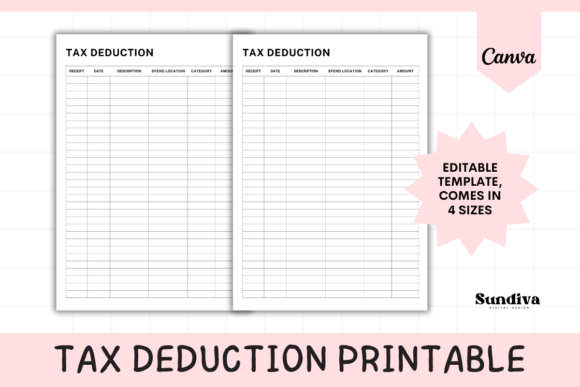
The strength of this template lies in its restraint. It embraces a "less is more" philosophy that aligns with modern graphic design trends. The layout is defined by clean lines and ample white space, creating a grid system that is easy to scan. Unlike cluttered spreadsheets that induce visual fatigue, this template uses a structured hierarchy to guide the eye. It features 6 distinct columns: Spend Location, Date, Category, Description, Amount, and Receipt. This specific structure ensures that every transaction is logged with the necessary metadata required for tax filing.
From a design perspective, the typography is functional and legible, avoiding the pitfalls of overly decorative script fonts or hard-to-read handwritten fonts. The visual personality is neutral yet professional, making it a versatile design asset for any business owner. Whether you are a freelancer managing client expenses or a small business owner tracking inventory costs, the layout provides a consistent framework. The aesthetic appeal comes from its precision; it looks organized because it is organized. This visual order translates directly into mental clarity when you sit down to review your quarterly numbers.
Beyond Spreadsheets: Real-World Applications
While the primary function is accounting, the utility of Tax Deduction Tracker Canva Template 3 extends into various aspects of business management. For content creators and bloggers, tracking software subscriptions, ad spend, and equipment purchases is vital. This template allows you to categorize these expenses visually, making it easier to see where your budget is going.
Consider the workflow of a graphic designer or a packaging design specialist. You might purchase stock photography, specific serif fonts or sans serif fonts, and printing samples. Logging these immediately into the tracker ensures that when tax time arrives, you aren't hunting through email archives for invoices. It acts as a centralized hub for your commercial font licenses and software renewals.
Furthermore, this tool is excellent for those managing brand identity projects for clients. You can use the template to track project-specific expenses separately, ensuring you bill clients accurately for reimbursements. It is not just a tax tool; it is a business intelligence tool that helps you understand your operational costs. The Canva editability means you can adjust the categories to fit specific projects, whether you are tracking costs for web design, social media graphics, or physical editorial design production.
Design Flexibility: The Canva Advantage
One of the most significant benefits of this product is its integration with Canva. We live in a world where design tools need to be accessible. You do not need to be a master of Adobe InDesign to manage your paperwork. Because the template is editable in Canva, you have the freedom to customize the visual language to match your brand identity.
If your brand utilizes a specific premium font or a particular color palette, you can easily apply those to the tracker. This creates a cohesive ecosystem for your business materials. Imagine your invoices, mood boards, and tax trackers all sharing the same modern typography and visual style. It reinforces professionalism, even in the mundane aspects of business administration.
The availability in US Letter, Half Letter, A4, and A5 sizes is a thoughtful touch for the practical creative. The A5 size, for example, is perfect for slipping into a planner or a project binder. The Half Letter size works beautifully for those who prefer a compact clipboard system on their desk. This adaptability ensures that the tool fits into your existing workflow rather than forcing you to adapt to it. It respects the physical reality of how different people organize their workspaces.
Practical Guidance for Implementation
To get the most out of this creative font and layout tool, you need a system. Simply downloading the PDF and opening the link is the first step, but consistency is key. Here is how to implement this tracker effectively:
- Establish a Routine: Do not wait until the end of the month. Make it a habit to log expenses every Friday afternoon. The simple layout of the Tax Deduction Tracker makes this a 5-minute task, not a 2-hour chore.
- Customize Categories: While the template provides a structure, think about your specific needs. If you are a marketer, you might want to track "Ad Spend" as a category. If you are a crafter, "Materials" is essential. Use Canva’s text editing tools to rename these fields to match your reality.
- Pair it with Digital Storage: The "Receipt" column is a placeholder for organization. Use a naming convention (e.g., "Date_Vendor_Amount") that matches the physical or digital scan of your receipt. This creates a foolproof font pairing of data and documentation.
- Print vs. Digital: Decide if you are a paper person or a tablet person. The A4 and US Letter sizes are great for printing, while the A5 can be used digitally on an iPad with a note-taking app if you prefer a paperless approach.
Remember, the goal is not just to record numbers, but to visualize your business health. By using a well-designed template, you turn a mundane administrative task into a moment of clarity. You can spot trends, identify waste, and prepare for tax season with the confidence of a seasoned professional. This tool is more than a PDF; it is a commitment to running a tighter, more visually coherent business. Whether you are a hobbyist turning a passion into a profession or an established entrepreneur, keeping clear records is the foundation of success.